Monday, 21 November 2011

You're all awesome!

So, I'm very excited, as I've hit 100 followers!


If a little overwhelming, I mean I am aware of the many, many (most) other blogs who have hundreds and thousands of followers. But to me this is huge. I have between 200 and 350 people each day who read my blog. How crazy is that? Sometimes I look at that and I just think, wow. How did that happen?

Anyway, I wanted to say a big thank you to all of you who read and support me and give me advice. Because you're all lovely sweet people, whose blogs and comments I've read and who have never given me any nasty comments. Not even when I shared this picture:


along with these confessions!

So I'm going to give away some advertising space on my sidebar. I've never had advertisers before so I'd like one of you to be the first. In fact two of you. 

Leave a comment below, anything you like. If your stuck maybe tell me which project or tutorial you like the best? Then I know what to do some more of! But anything goes. Just include a link to whatever you want advertising. I'm happy to advertise a shop, blog or anything else appropriate to my blog. 

Your advert (150 x 150) will go live on Thursday 1st December and will run for two months.

I'll pick two winners on the Monday the 28th. If you have an advert already great! If not as long as you can just provide me with an image and a link I can take it from there. 


Please make sure you're a follower to enter. Good luck!

Winter Beach Trip


Well that's what you get when you ask your three year old what she wants to do on her Daddy's week off!


But it was beautiful, with thousands of washed up muscle shells. And deserted!


I actually now think it may become a family tradition!


And speaking of traditions...


Men eh? Every time he sees one! 


Good job he's so handsome.

Tuesday, 15 November 2011

Bauble Wreath

So, the beginning of this year when I first started my blog, and had like three followers, I blogged about this bauble wreath:


The tutorial is so simple, just bend a coat hanger into a circle, thread on baubles and twist in the ends. Hot glue any the fall off. Tie on a ribbon to hang and your done!


Click here for the original tutorial.


Photobucket

Sunday, 13 November 2011

How to make a pretty tutorials page

Well, much improved to how I had it anyway!


It took me a long time to work out the right size of image to get to fit my page. (Like an hour!) Hopefully if you want to do something like how mine is above, this will cut down on the time you have to spend to make it!

First upload your chosen image (the one you will have people click on to go to that tutorial) onto picnik.com (the editing you need is free for all of this, and even some touch ups if you want to do those too.).


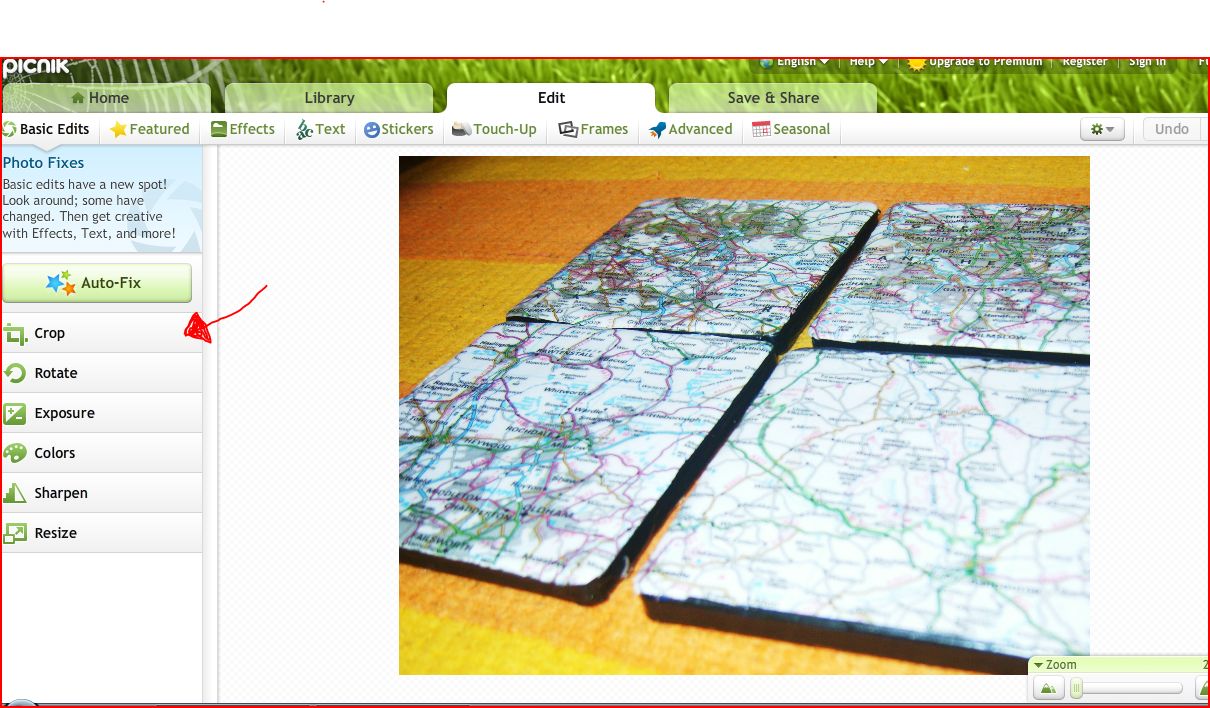
Edit it first to make it pretty and then click on 'edit' on the top tab and then 'crop' on the left side menu. 


I know, awesome freestyle arrow drawing skills.


Then select square. You can have it so it's not quite a square, but when you change the size later you may end up with a squashed image (I learned this the hard way...).


Crop your image and then select 'apply'.


Then click 'text' to add the name of your tutorial. 


Choose the font, adjust the colour and size, move it around and then click 'apply' when you're done.


Next click 'resize' , I know you're blown away by my helpful arrows and circling!


Change the dimensions to 170 x 170 and click apply.

Then save to your computer and insert the image onto your tutorials page. Make it a link using this post. 

You may need to adjust your size slightly to work for your blog, but mine is a standard width and it does three on a line easily.


Let me know if you have any questions. Or if you do it yourself. Or if you already knew how to do this and I'm just r e a l l y slow at picking this stuff up!

Enjoy your week!


Featured here:


MoneyMakingBlogs